
Passport Photo Size, Maker & Blue Background Guide (2026)
Published · Updated
Table of Contents
Every passport, visa, job form and ID card asks for a passport photo, and a wrong size or background gets your application rejected. This guide covers the correct passport photo size, the background colour rules, and how to make a photo for free with our Passport Photo Maker.
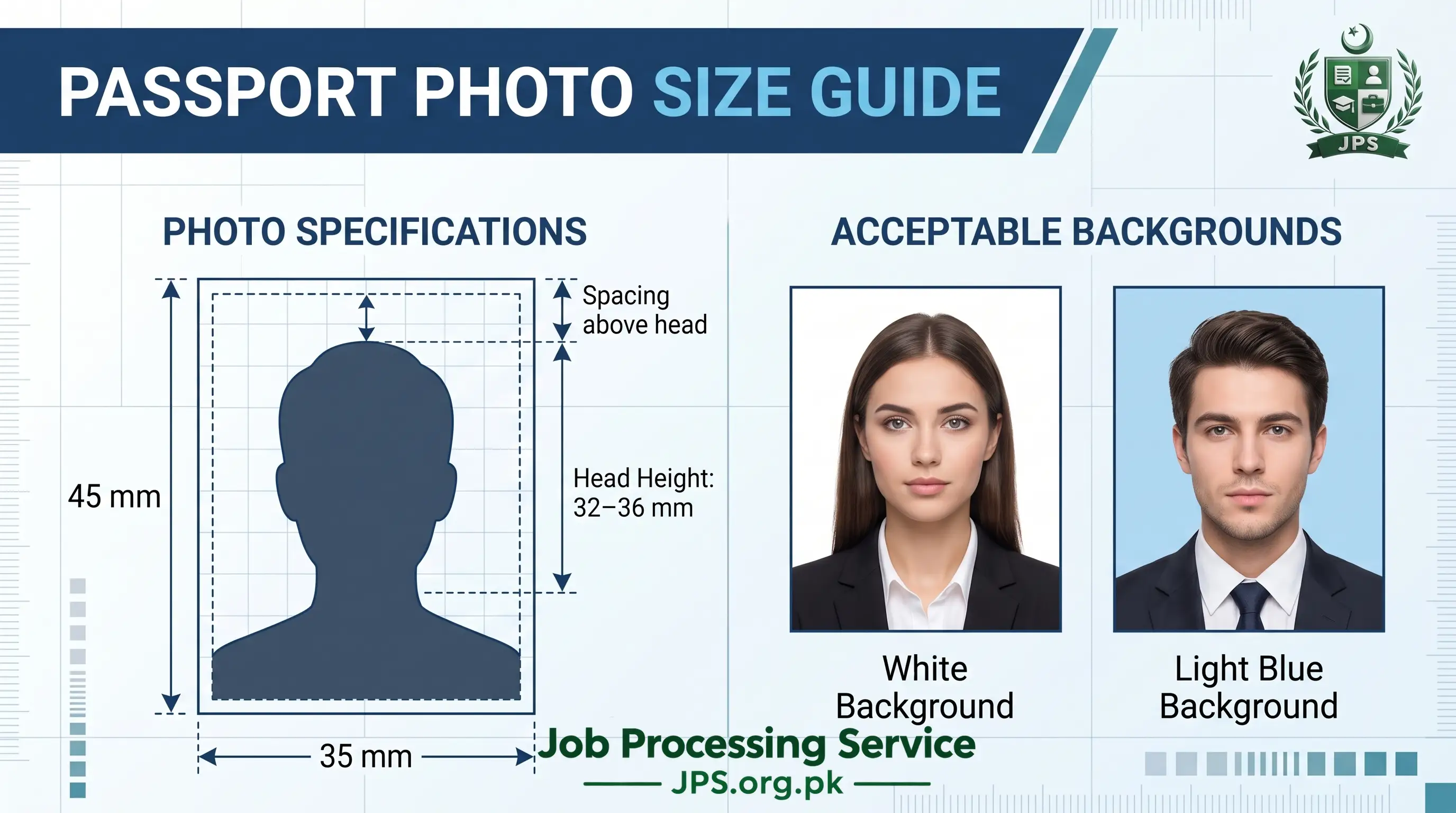
Quick answer: The most common passport photo size is 35 x 45 mm (1.38 x 1.77 inches), which is 413 x 531 pixels at 300 DPI. Pakistan, UK, Schengen countries and Australia use this size. The USA uses 2 x 2 inches (600 x 600 px).
Make it now: Use our free Passport Photo Maker. Choose your size, set a KB limit (for example 50 KB), download the photo and print a ready sheet. Your photo is never uploaded.
What Is a Passport Photo?
A passport photo is a recent, front-facing picture of your face on a plain background. Governments use it to identify you, so strict rules apply to size, background, face position and image quality. The same type of photo is used for visas, job applications, exam forms, student cards, domicile and CNIC forms. You also need it for your CV.
Passport Photo Size by Country
Size changes from country to country. Always check the latest rule of the office or form you are applying to.
| Country / Use | Size (mm) | Size (inches) | Pixels (300 DPI) |
|---|---|---|---|
| Pakistan (Passport / CNIC / Job forms) | 35 x 45 mm | 1.38 x 1.77 in | 413 x 531 px |
| United Kingdom | 35 x 45 mm | 1.38 x 1.77 in | 413 x 531 px |
| Schengen / Europe | 35 x 45 mm | 1.38 x 1.77 in | 413 x 531 px |
| Australia | 35 x 45 mm | 1.38 x 1.77 in | 413 x 531 px |
| USA | 51 x 51 mm | 2 x 2 in | 600 x 600 px |
| India | 51 x 51 mm | 2 x 2 in | 600 x 600 px |
| Canada | 50 x 70 mm | 1.97 x 2.76 in | 591 x 827 px |
| China | 33 x 48 mm | 1.30 x 1.89 in | 390 x 567 px |
| Saudi Arabia (Visa) | 40 x 60 mm | 1.57 x 2.36 in | 472 x 709 px |
| UAE (Visa) | 43 x 55 mm | 1.69 x 2.17 in | 508 x 650 px |
Tip: Many Pakistani job forms only say "passport size photo". In that case 35 x 45 mm is the safest choice, unless the advertisement gives a different size. If the form gives a size in pixels (for example 300 x 400 px), you can enter it in the tool too.
Passport Photo Layout (Face Position)
Size is not the only rule. Your face must also be placed correctly. Use this table for a 35 x 45 mm photo.
| Part of Photo | Correct Measurement |
|---|---|
| Top of head to chin | 32 to 36 mm (about 70% to 80% of photo height) |
| Space above the head | 2 to 4 mm |
| Eyes position | Upper middle of the photo, level and open |
| Face direction | Straight at the camera, centered |
| Shoulders | Both visible, straight, not tilted |
Passport Photo Requirements Checklist
- Photo taken within the last 6 months.
- Neutral expression, mouth closed, both eyes open.
- No glasses if possible (glare is a common reason for rejection).
- Plain background with no shadows behind you.
- No filters, beauty effects or heavy editing.
- Sharp, clear image, not blurry or pixelated.
- Head covering only for religious reasons, and the full face must stay visible.
Blue Background Passport Photo: When Is It Needed?
Most passports and visas ask for a white or light background. A blue background passport photo is usually requested for job applications, university and exam forms, student cards and some ID or license forms. Read the instruction of your form first, because the wrong colour is a common reason for rejection.
| Background Colour | Commonly Used For |
|---|---|
| White | Passports, most visas |
| Blue | Job forms, exam forms, student and ID cards |
| Light grey / off-white | Some visas (for example Schengen) |
Blue shades you can use (approximate):
- Standard blue: #2F6FBF
- Light blue: #5B9BD5
Use a plain, even colour with no gradient and no texture. Important: our tool fills the background colour only where the photo is transparent. It does not remove an existing background. To get a blue background, first remove the background with a free tool such as remove.bg or Canva, save it as a transparent PNG, then upload that PNG to the Passport Photo Maker and choose the blue colour.
How to Use the Passport Photo Maker (Step by Step)
Our free Passport Photo Maker works on mobile and computer, needs no sign-up and runs inside your browser. Follow these steps.
Step 1: Select Your Photo
Open the Passport Photo Maker and tap "Select Photo". Choose a clear, front-facing photo (JPG, PNG or WEBP). On mobile you can also take the picture with the camera. If your iPhone photo is in HEIC format and does not open, export it as JPG first.
Step 2: Choose Size and Options
- Photo size: Pick a ready size such as Pakistan 35 x 45 mm, US 2 x 2 inch, Saudi, UAE, stamp size or pixel sizes like 300 x 400 px. You can also choose "Custom size" in mm, cm, inch or px.
- DPI: Keep 300 DPI for printing, or 96 DPI for screen-only forms.
- Format: Use JPG if your form has a KB limit.
- Max / Min file size (KB): Enter 50 if your form says "under 50 KB". Enter a Min size if the form needs at least (for example) 20 KB.
- Background colour: Choose white, light blue, light grey or any custom colour.
Step 3: Adjust the Photo
Drag the photo with your finger or mouse, and zoom with a pinch, the mouse wheel or the slider. Place your face inside the green guide, with the eyes near the horizontal line. You can also rotate the photo and change brightness and contrast.
Step 4: Create and Download
Press "Create Photo". The tool shows the final size, DPI and file size in KB. Press "Download Photo" to save it.
Step 5: Print Multiple Photos on One Sheet
Under "Print Sheet", choose 4 x 6 inch, 5 x 7 inch, A4 or Letter paper and the number of copies, then download the sheet. Print it at any photo shop, or at home at 100% / Actual size (do not use "fit to page"). Thin grey lines show where to cut.
| Paper Size | Approx. Photos (35 x 45 mm) |
|---|---|
| 4 x 6 inch photo paper | 8 photos |
| A4 sheet | Up to 30 photos |
How to Take a Good Photo at Home
Stand in front of a plain light wall in daylight, facing a window. Ask someone to take the photo at eye level from about 1 meter. Keep your head straight and look directly at the camera. Avoid flash, shadows and filters.
Common Mistakes That Get Passport Photos Rejected
| Mistake | How to Fix It |
|---|---|
| Wrong size | Use the exact size in mm or pixels from the table above |
| Wrong background colour | Check the form, then use white or blue as required |
| Shadows on face or background | Take the photo in soft daylight facing a window |
| Face too small or too large | Keep head height at 32 to 36 mm using the green guide |
| File too big for the portal | Enter the Max KB (for example 50) in the tool |
| Blurry or low-quality image | Use a sharp photo and export at 300 DPI |
| Heavy filters or editing | Use a natural, unedited face |
More Free Tools for Your Job Application
- Image Resizer and Converter: resize any image by pixels or KB, convert HEIC to JPG.
- Signature Resizer: make your signature 140 x 60 px and under 20 KB.
- Image to PDF: combine CNIC and certificates into one PDF.
- PDF Compressor: reduce a PDF to 100 KB or 200 KB.
Frequently Asked Questions
What is the standard passport photo size?
35 x 45 mm (1.38 x 1.77 inches) is the most common size. The USA uses 2 x 2 inches.
What is the passport photo size in pixels?
For 35 x 45 mm at 300 DPI, the size is 413 x 531 pixels.
How do I make a passport photo under 50 KB?
Open the Passport Photo Maker, choose JPG, enter 50 in "Max file size (KB)" and press Create Photo. The tool lowers the quality automatically until the file fits.
Can I make a passport photo with my phone?
Yes. Take a clear photo against a plain wall, upload it to the Passport Photo Maker, adjust it and download it. You can then print it at a photo shop.
Is my photo uploaded to your server?
No. The photo is processed inside your own browser and is never sent to or stored on our server.
Which background is required for a passport photo?
White or light background for most passports and visas. Blue is commonly requested for job, exam and ID forms. Always follow your form's instruction.
Is a blue background accepted for a passport?
Usually not. Passports mostly need white or light backgrounds, so use blue only when the form specifically asks for it.
Can the tool remove my photo background?
No. It fills transparent areas with the colour you choose. Remove the background first with a free tool, then upload the transparent PNG.
How do I print passport photos at home?
Create the photo, then use the Print Sheet option to download a 4 x 6 inch or A4 sheet. Print at 100% scale so the photos keep their real size.
Final Words
Correct size, plain background and proper face position decide whether your photo is accepted. Choose the size from the country table, set the right background colour and check the layout before printing. Ready to start? Open the free Passport Photo Maker and get your photo in a minute.
Related Guides
Staff
JPS Staff is a dedicated team focused on helping job seekers through recruitment updates, application processing guidance, document preparation, eligibility requirements, test schedules, and interview information. Our content is designed to simplify the application journey and keep candidates informed.
 EasyPaisa
 Jazz Cash
 Meezan Bank
 Faysal Bank
Comments (0)